
PayBot
PayBot
PayBot is a bot service that makes settling up between teammates easy within a Slack workspace. It lets you smoothly handle the complex settlement processes that arise in various situations—team dinners, gifts, meals, and more—using nothing but Slack messages.
It was developed using the Slack API and the Bolt.js framework. Users can securely register their bank account with the /계좌등록 command, and request a split (1/N) settlement with a specific user via the /정산하기 command. When a settlement is requested, a DM is automatically sent to the target user, providing the requester’s account information along with a link that takes them directly to the Toss money-transfer page.
The Node.js-based server is deployed to a home server through nginx, and it uses MongoDB as its database to encrypt and securely store users’ account information while systematically managing settlement records. By automating the repetitive and tedious settlement process, it helps teams resolve the financial issues that come up during collaboration in a transparent and efficient way.
Features
- Encrypted storage of account information with the ‘/계좌등록’ command
- 1/N settlement requests with specific users via the ‘/정산하기’ command
- Automatic DM dispatch on a settlement request
- Automatic linking to Toss money transfer, with the amount and account information automatically populated
- An encrypted account information management system
Screenshots
Registering an account
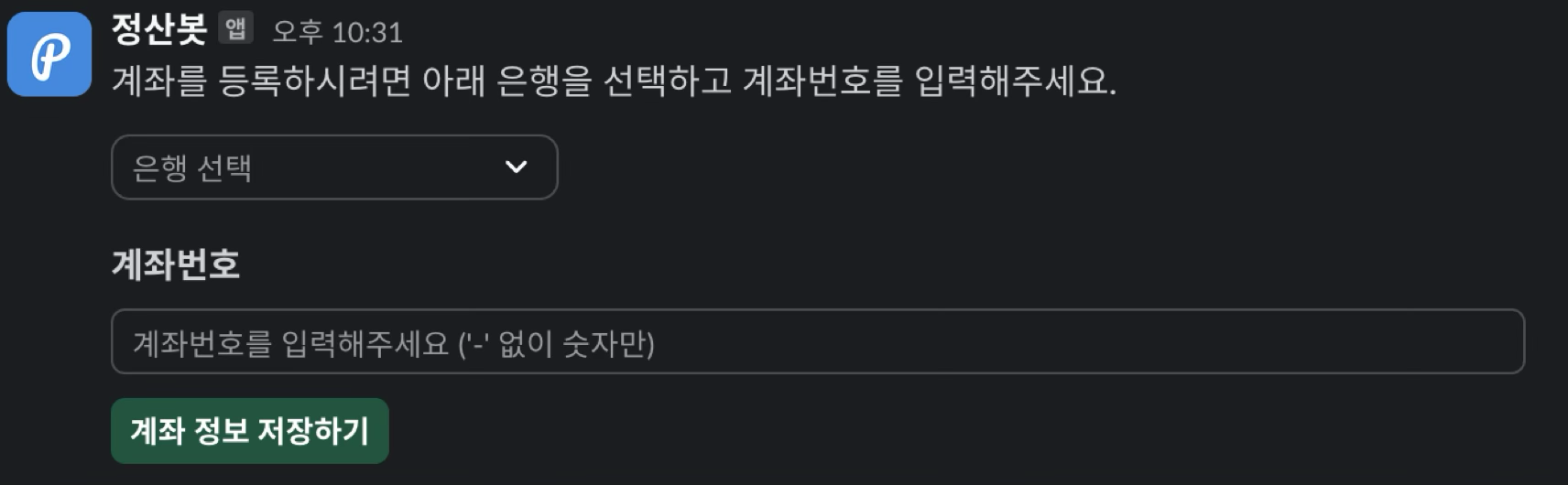 You can easily register your account through a Slack command. The user’s account information is securely encrypted and stored.
Requesting a settlement
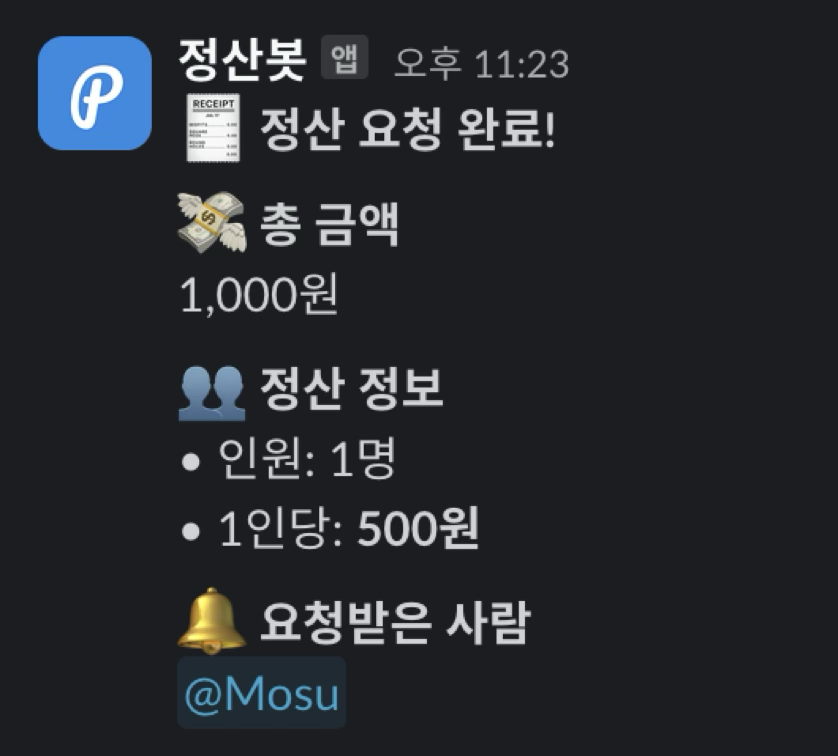 You can easily request a settlement by selecting the amount and the recipients. It is automatically calculated using the 1/N settlement method.
Receiving a settlement request
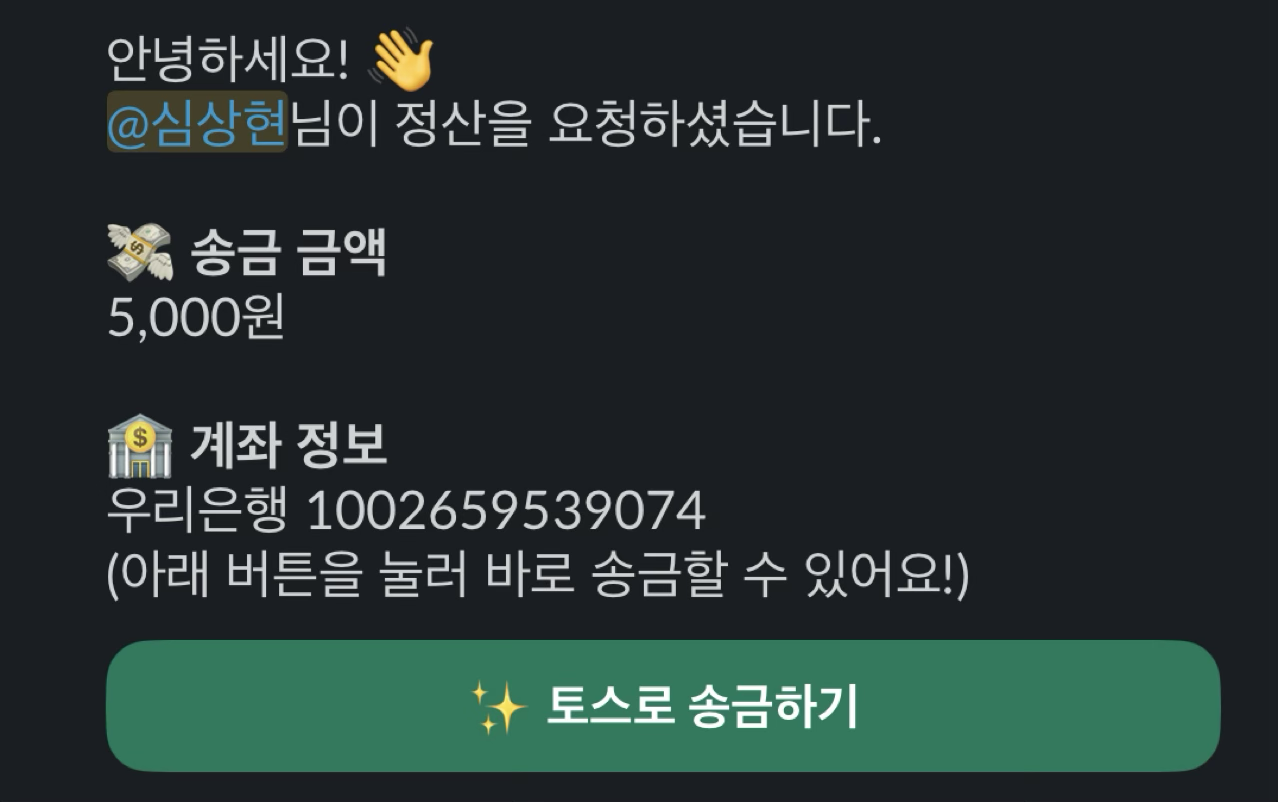 A DM is automatically sent to the user who receives the settlement request. The transfer amount and account information are displayed, and a Toss money-transfer link is provided.
Tech Stack
- Slack API: Slack platform integration
- Bolt.js: Slack app development framework
- Node.js: Backend server
- MongoDB: Database
- nginx: Web server and reverse proxy
Challenges and Solutions
Deliberating over the deployment environment
I wanted to deploy this service, but I didn’t want to rent additional servers from AWS or a cloud service. I thought hard about whether deploying to a cloud service would actually mean many people would use it, and whether availability mattered that much—and in the end, I decided to host it on a home server.
Once it was running on a home server, there were many small problems, such as setting up port forwarding on the router and configuring the server through certbot and nginx to communicate over HTTPS.
In addition, the Slack OAuth logic absolutely had to be verified through a domain, so there were parts that were hard to apply—for instance, when I made changes locally, I would sometimes have to alter the nginx configuration to check whether they had been reflected properly.
Solving the data persistence problem
At first I stored all data in memory, which caused a problem where the data was reset every time the home server shut down or a new version was deployed.
To solve this, using a database was essential. Rather than running it on the same computer as the server, I wanted to use a cloud service so that I could recover the data again even if the server computer was wiped or a natural disaster occurred.
I initially considered using AWS RDS, but instead of the expensive RDS, I chose to use MongoDB Atlas to store and manage the data for free.
The stored values were encrypted using the AES-256 algorithm, which meant that even if the database were exposed externally, the personal information would be encrypted, minimizing the damage.