Building Rich Events in Flutter Without App Updates
Hello! I’m Sanghyeon Sim. I currently work as a Flutter Engineer at a company called Tailcrew, building a web novel platform service called “Mopic.”
This is a summary of a talk I gave at Soongsil University’s Developer Conference, DEVCON.
The Problem
We’re building a web novel platform, and while working on it I ran into a problem I’d like to share. We wanted to build an event page as a new feature. The idea was to let users immediately see what events were going on. There are several ways to implement an event page like this, and these were the options we considered.
Option 1. Build it with a WebView.
At first, the obvious choice was to build it with a WebView. This kind of screen changes constantly, and there was a very high chance it would need frequent updates. But there was one problem. The event page could include dynamic interactions.
Tapping the image on the left should navigate to the novel detail page on the right.

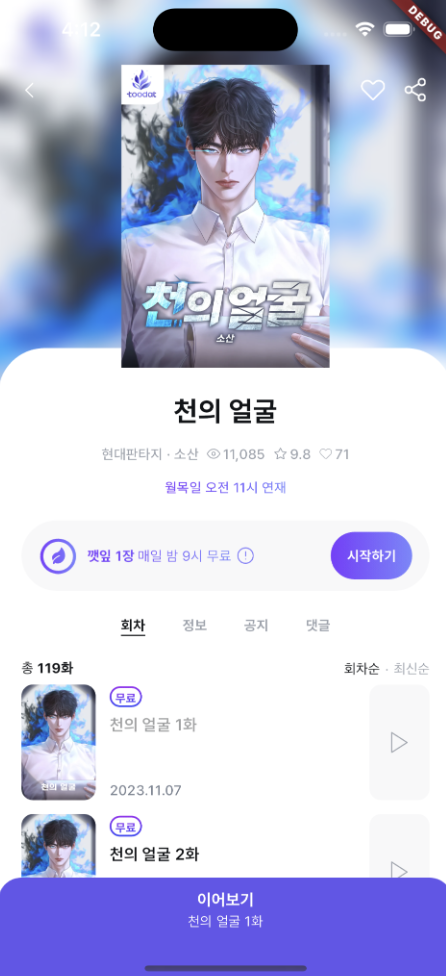
Beyond navigating to a novel, a variety of interactions had to happen: calling an API, showing a dialog from inside the app, and more. In a situation like this, using a WebView alone meant I had to figure out how the WebView area could invoke code that lives inside Flutter.
Option 2. Build it as a page inside the app. (Build and ship it in Flutter using Dart code.)
So then I considered: what if we implemented it as a screen inside the app instead? In that case, since everything happens inside the app, running the in-app code I mentioned earlier (showing a dialog, navigating to a page, etc.) was easy, but every app release forced a new update on users.
The Solution
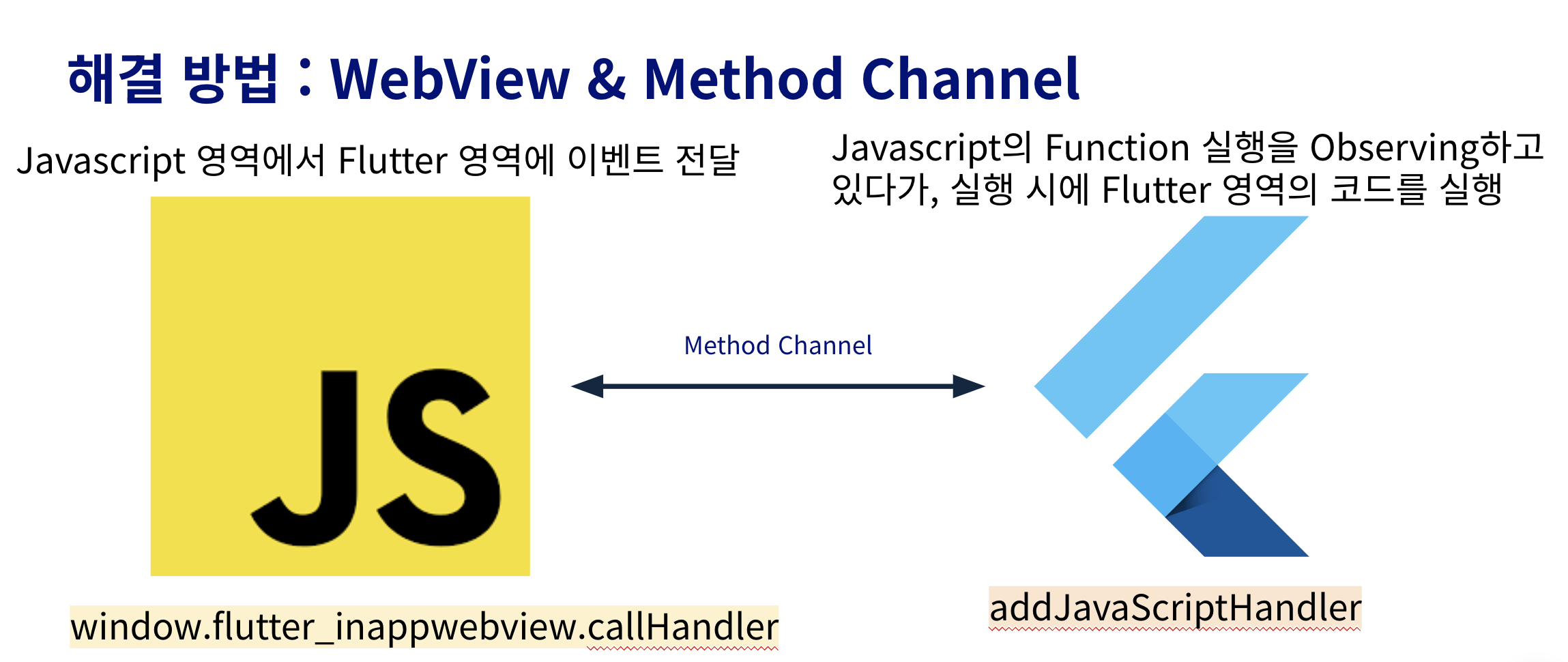
In the end, after a lot of thought, I solved it by combining Method Channels and a WebView. A Method Channel is a technology that lets you execute native code, or pass data and call functions from the native side into the Flutter side.
Flutter’s Method Channel can execute native Android and iOS code, or run Flutter code from the native side.
Also, using a WebView lets you update content inside the app without going through the App Store or Play Store. You just redeploy the web side!
So the following architecture came to life.
Shall we take a look at the code? All the code is up on Github.
First, let’s look at the HTML code.
Location: assets/test.html
<!DOCTYPE html>
<html lang="ko">
  <body>
    <script>
      // dialog라는 이벤트에 첫번째 인자로 "EVENT_TITLE_HELLO" 데이터 전달
        function dialog() {
            window.flutter_inappwebview.callHandler('dialog', 'EVENT_TITLE_HELLO');
        }
    </script>
    <h1 style="color: black" onclick="dialog()" >ON TAP DIALOG EVENT!</p>
  </body>
</html>
You can see that inside the dialog function, it passes the data "EVENT_TITLE_HELLO" as the first argument to the dialog event over on the Flutter side.
Location: lib/webview/webview.dart
Note: This code uses flutter_inappwebview: ^5.8.0. Depending on package version updates, the arguments or values in this code may not run correctly.
  @override
  Widget build(BuildContext context) {
    return Scaffold(
      appBar: AppBar(
        backgroundColor: Theme.of(context).colorScheme.inversePrimary,
        title: Text(widget.title),
      ),
      body: InAppWebView(
        initialFile: '/assets/test.html',
        initialOptions: InAppWebViewGroupOptions(
          crossPlatform: InAppWebViewOptions(
            javaScriptEnabled: true,
            useShouldOverrideUrlLoading: true,
            mediaPlaybackRequiresUserGesture: false,
            useOnLoadResource: true,
            allowFileAccessFromFileURLs: true,
            allowUniversalAccessFromFileURLs: true,
            transparentBackground: true,
          ),
        ),
        onLoadStop: (controller, url) {
          webViewController = controller;
          addDialogEvent(context);
        },
      ),
    );
  }
}
The part worth paying attention to is addDialogEvent. Once the WebView has finished loading, the addDialogEvent function adds an observer for the dialog action.
void addDialogEvent(BuildContext context) {
    webViewController?.addJavaScriptHandler(
    // event handler 이름 등록
      handlerName: "dialog",
      callback: (args) {
        showDialog(
          context: context,
          builder: (context) => AlertDialog(
            title: const Text("Dialog"),
            // argument 사용
            content: Text(args[0]),
            actions: [
              TextButton(
                onPressed: () {
                  Navigator.of(context).pop();
                  Navigator.of(context).push(
                    MaterialPageRoute(
                      builder: (context) => const LocalView(),
                    ),
                  );
                },
                child: const Text("OK"),
              ),
            ],
          ),
        );
      },
    );
  }
With this approach, the data received as an argument for the dialog event can be used in the code inside the Flutter app.
And if you adopt this approach, you can declare the interfaces for things that need to run inside the app up front, then call them by their event name from the web side so the work happens on the Flutter side. This makes the work easy. (In practice, there aren’t that many events you need to observe inside the app, so it’s straightforward to implement.)
Wrapping Up
I don’t think the approach I came up with is the best possible one. There are many ways to build an event page, but when I was solving this problem and weighing the various options, as far as I knew there was no established best practice for it, and this felt fast to implement and easy to maintain. To implement this part, you need to collaborate with the backend and web developers. You need to think about which interfaces Flutter will call and what data the backend will send down. If you spot any issues or have advice, feel free to leave a comment anytime.